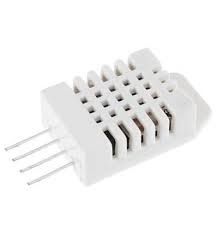
DHT22/AM2302 Digital Temperature and Humidity Sensor Module
R68.70
Sold out
Sold out
DHT22/AM2302 Digital Temperature and Humidity Sensor Module
Product Details
DHT22 / AM2302 Digital Temperature and Humidity Sensor Module – Technical Specifications:
| Sensor Type | – Capacitive Digital Temperature & Humidity Sensor |
| Model | – DHT22 / AM2302 (Identical Specification) |
| Operating Voltage | – 3.3V to 5.5V DC |
| Operating Current | – 1.5mA (Measuring) / 40µA (Standby) |
| Temperature Range | – -40°C to +80°C |
| Temperature Accuracy | – ±0.5°C |
| Temperature Resolution | – 0.1°C |
| Humidity Range | – 0% to 100% RH |
| Humidity Accuracy | – ±2% RH |
| Humidity Resolution | – 0.1% RH |
| Output Type | – Single-Wire Digital Serial (1-Wire) |
| Minimum Sampling Interval | – 2 Seconds |
| Interface | – 3-Pin Header (VCC, DATA, GND) |
| Dimensions | – 25 × 15 × 8mm (approx.) |
| Weight | – ±4g |
| Compatible Platforms | – Arduino, ESP8266, ESP32, Raspberry Pi, STM32 |
DHT22 vs DHT11 — Key Differences:
| DHT22 / AM2302 | DHT11 | |
|---|---|---|
| Temperature Range | -40°C to +80°C | 0°C to +50°C |
| Temperature Accuracy | ±0.5°C | ±2°C |
| Humidity Range | 0–100% RH | 20–90% RH |
| Humidity Accuracy | ±2% RH | ±5% RH |
| Resolution | 0.1°C / 0.1% RH | 1°C / 1% RH |
| Sampling Interval | 2 Seconds | 2 Seconds |
| Best For | Precision & wide range | Budget & basic projects |
Handy Tips for Using the DHT22 / AM2302 Sensor Module:
1: The DHT22 and AM2302 are electrically identical — the AM2302 is simply the wired, non-module version of the same sensor in a larger housing with leads attached. Both use the same code, libraries, and wiring. The module version (DHT22) typically includes an onboard pull-up resistor on the data line, making it easier to use directly without additional components.
2: Use the DHT sensor library by Adafruit in Arduino IDE for the quickest setup. Install it via the Library Manager, then initialise the sensor with DHT dht(PIN, DHT22); — make sure to specify DHT22 and not DHT11, as they use different communication protocols and the wrong selection will return incorrect readings. The same library supports both sensor types.
3: The DHT22 has a mandatory minimum sampling interval of 2 seconds between readings — reading it faster than this will return the previously cached value rather than a fresh measurement. In your code always include a delay(2000) or use a non-blocking timer to ensure at least 2 seconds pass between each call to dht.readTemperature() and dht.readHumidity().
4: Always validate your readings before using them in your project — the DHT22 can occasionally return NaN (Not a Number) due to timing issues on the single-wire interface. Add a check in your code: if (isnan(temperature) || isnan(humidity)) and skip or retry the reading if either value is invalid. This is especially important in fast-running loops.
5: The DHT22 is significantly more capable than the DHT11 — with a wider temperature range of -40°C to +80°C, ten times better resolution (0.1° vs 1°), and far greater accuracy (±0.5°C vs ±2°C). It is the recommended choice for any project where measurement precision matters, outdoor sensing is required, or temperatures below 0°C may be encountered.
Display prices in:ZAR