ESP32 Basic Starter Kit
Share
R433.91
Sold out
Sold out
ESP32 Basic Starter Kit
Share
Product Details
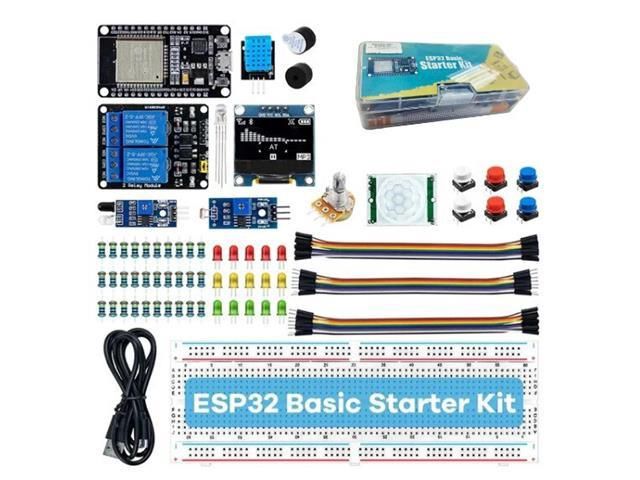
ESP32 Basic Starter Kit – Technical Specifications:
| Main Controller | – ESP32 Development Board (Wi-Fi + Bluetooth) |
| Display | – 0.96" OLED (128 × 64px, I2C Interface) |
| Breadboard | – 830 Tie-Point Solderless Breadboard |
| Temperature & Humidity Sensor | – DHT11 Module (0–50°C / 20–90% RH) |
| Motion Sensor | – HC-SR501 PIR Passive Infrared Motion Sensor |
| Obstacle Detection | – Infrared Obstacle Avoidance Module |
| Light Sensing | – Photosensitive (LDR) Resistor Module |
| Relay Module | – 5V 2-Channel Relay Module (10A / 250V AC) |
| Potentiometer | – 10KΩ Rotary Potentiometer |
| Resistors | – 30 Pieces (10× 220Ω, 10× 1KΩ, 10× 10KΩ) |
| Buzzers | – 1× Active Buzzer + 1× Passive Buzzer |
| Push Buttons | – 6× Tactile Momentary Switches |
| LEDs | – 5× Red, 5× Yellow, 5× Green, 2× RGB (17 Total) |
| DuPont Cables | – 10× Male to Male, 10× Male to Female, 10× Female to Female |
| USB Cable | – 1× Micro USB Cable |
| Compatible IDE | – Arduino IDE, ESP-IDF, MicroPython, PlatformIO |
Handy Tips for Using the ESP32 Basic Starter Kit:
1: The ESP32 is the heart of this kit — a powerful dual-core microcontroller with built-in Wi-Fi and Bluetooth, significantly more capable than an Arduino Uno or Nano. It runs at up to 240MHz, has 34 programmable GPIO pins, and supports analogue input, PWM, I2C, SPI, UART, and touch sensing. Program it using the Arduino IDE by installing the ESP32 board package via the Board Manager, or use MicroPython for a beginner-friendly Python-based approach.
2: The 0.96" OLED display connects via the I2C bus — typically SDA to GPIO21 and SCL to GPIO22 on most ESP32 boards. Use the Adafruit SSD1306 and Adafruit GFX libraries in Arduino IDE to get it up and running quickly. It is perfect for displaying sensor readings, status messages, or simple graphics without needing a computer or serial monitor connected.
3: The DHT11 sensor measures both temperature (0–50°C) and relative humidity (20–90% RH) from a single data pin. Use the DHT sensor library by Adafruit in Arduino IDE. Note that the DHT11 has a minimum sampling interval of 2 seconds — reading it faster than this will return stale or incorrect data. For higher accuracy, the DHT22 is an upgraded alternative with a wider range and better resolution.
4: The HC-SR501 PIR sensor has two onboard potentiometers — one adjusts detection sensitivity (range) and the other adjusts the output hold time (how long the output stays HIGH after motion is detected). It also has a jumper to select between single trigger (output goes LOW immediately after hold time) and repeat trigger (output stays HIGH as long as motion continues) modes. Set these before mounting the sensor in your project.
5: The 2-channel relay module allows the ESP32 to switch mains-voltage appliances (up to 250V AC / 10A) using a low-power GPIO signal. Most relay modules of this type are active LOW — meaning the relay activates when the control pin is pulled LOW, not HIGH. Always test relay behaviour with a low-voltage load first before connecting any mains wiring, and exercise appropriate caution when working with high voltages.
6: Use the 10KΩ potentiometer connected to one of the ESP32's ADC (analogue input) pins to explore analogue reading in code. Note that the ESP32's ADC has a known non-linearity issue — readings between approximately 0.1V and 3.1V are most accurate. For precise analogue measurements, consider applying a calibration offset in your code or using an external ADC module.
7: The passive buzzer requires a PWM signal to produce sound — you control the frequency to change the pitch, making it capable of playing tones and simple melodies. The active buzzer has an internal oscillator and simply turns on and off with a HIGH/LOW signal, producing a single fixed tone. They look similar but behave very differently — check the underside of the component for the label before connecting.
Display prices in:ZAR