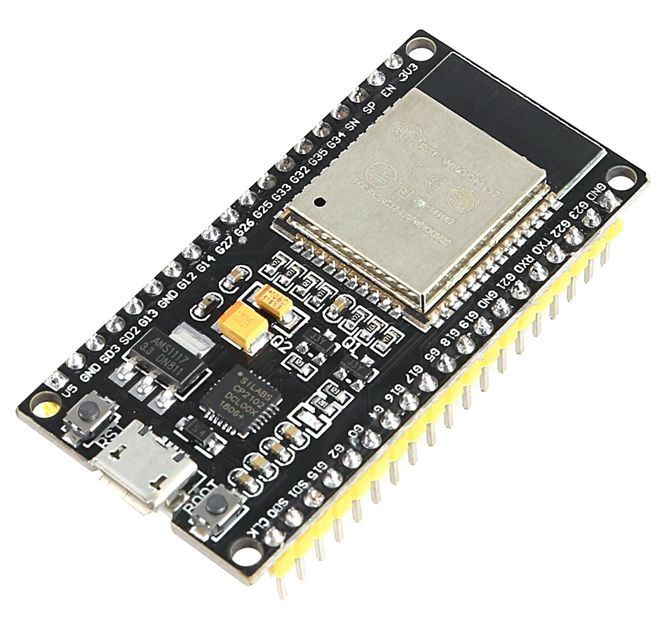
ESP32 Dev Board - WROOM chip - USB C
Share
R173.04
Sold out
Sold out
ESP32 Dev Board - WROOM chip - USB C
Share
Product Details
ESP32 Dev Board – WROOM-32 with USB-C – Technical Specifications:
| Module | – ESP32-WROOM-32 |
| Chip | – ESP32-D0WDQ6 Dual-Core 32-bit LX6 Microprocessor |
| CPU Speed | – Up to 240MHz (Adjustable) |
| ROM | – 448KB |
| SRAM | – 520KB |
| Flash Memory | – 4MB (Onboard SPI Flash) |
| Wi-Fi | – 802.11 b/g/n (2.4GHz), up to 150Mbps |
| Bluetooth | – Bluetooth 4.2 BR/EDR + BLE |
| GPIO Pins | – 38 Pins Total (30 Usable GPIO) |
| Analogue Inputs (ADC) | – 18 Channels (12-bit ADC) |
| DAC Outputs | – 2 Channels (8-bit DAC) |
| Touch Pins | – 10 Capacitive Touch GPIO |
| Communication | – SPI, I2C, I2S, UART, CAN |
| PWM | – 16 Channels |
| USB Interface | – USB-C (Programming & Power) |
| Operating Voltage | – 3.3V (Logic) |
| Input Voltage (USB-C) | – 5V |
| Onboard Regulator | – AMS1117 3.3V LDO |
| Onboard LED | – 1 × Blue LED (GPIO2) |
| Onboard Buttons | – EN (Reset) + BOOT (Flash Mode) |
| Operating Temperature | – -40°C to +85°C |
| Dimensions | – 51 × 28mm (approx.) |
| Compatible IDEs | – Arduino IDE, ESP-IDF, MicroPython, PlatformIO |
Handy Tips for Using the ESP32 WROOM Dev Board:
1: The ESP32 WROOM-32 is a powerful dual-core microcontroller with built-in Wi-Fi and Bluetooth — making it significantly more capable than the Arduino Uno or Nano for IoT and connected projects. The two cores can be used independently: Core 0 handles Wi-Fi and Bluetooth tasks in the background while Core 1 runs your main application code, allowing true parallel processing without performance compromise.
2: The USB-C connector on this board is used for both programming and power. Connect it to any USB-C cable to upload code via Arduino IDE or flash firmware via esptool. To upload code, the board will typically enter flash mode automatically — if it does not, hold the BOOT button while pressing EN (Reset), then release BOOT. Once flashing is complete, press EN to restart the board and run your code.
3: The ESP32's ADC (analogue to digital converter) has a known non-linearity issue — readings are most accurate between approximately 0.1V and 3.1V and become unreliable near 0V and 3.3V at the extremes. For precise analogue measurements, apply a calibration curve in your code using esp_adc_cal in ESP-IDF, or use an external ADC module such as the ADS1115 for the highest accuracy.
4: When using Wi-Fi or Bluetooth, note that ADC2 channels (GPIO 0, 2, 4, 12–15, 25–27) cannot be used simultaneously with Wi-Fi — attempting to do so will return errors or garbage values. If you need analogue input alongside Wi-Fi, use ADC1 channels only (GPIO 32–39), which are not affected by the radio.
5: The ESP32 operates at 3.3V logic — all GPIO pins are 3.3V and are not 5V tolerant. Connecting a 5V signal directly to any GPIO pin will damage the chip over time. When interfacing with 5V sensors, displays, or modules, always use a logic level shifter or a simple voltage divider (two resistors) on the signal line to step the voltage down to a safe 3.3V level before it reaches the ESP32.
6: For the best Wi-Fi range and signal stability, avoid placing the board inside a fully enclosed metal enclosure — the onboard PCB antenna on the WROOM module needs a clear line of sight. Orient the board so the antenna end (the end without the USB connector) faces away from large metal objects, ground planes, and other RF-emitting devices such as motors and switching power supplies.
Display prices in:ZAR